
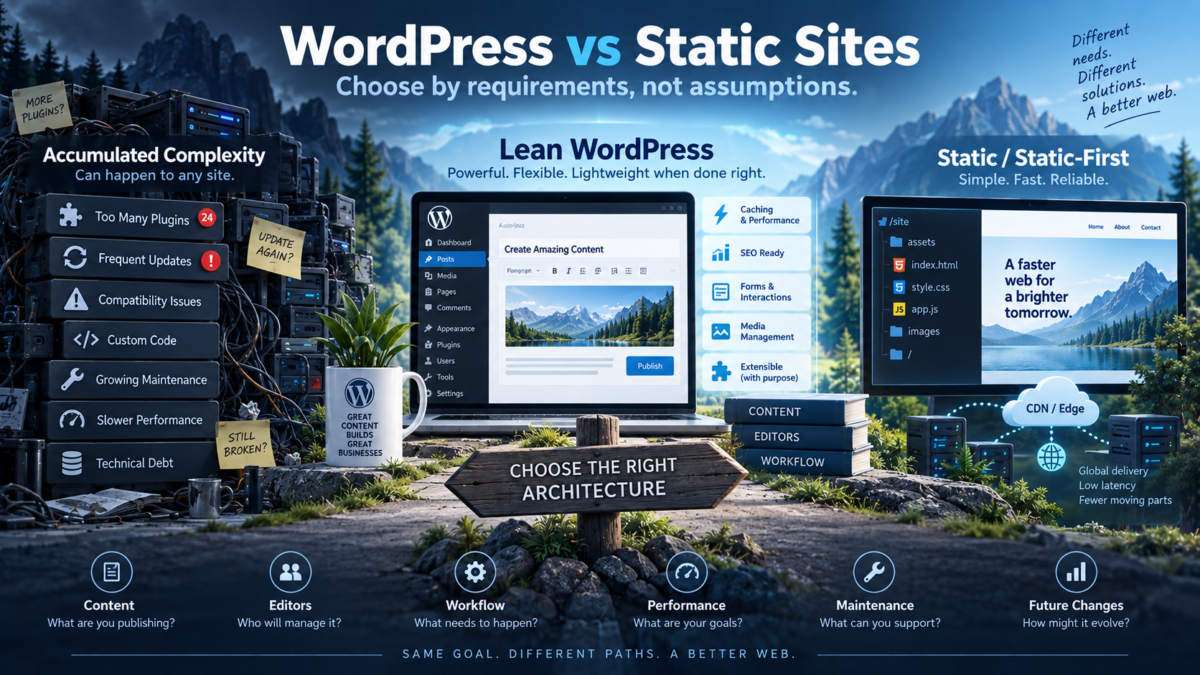
A website does not become technically better simply because it uses fewer technologies. It becomes better when its architecture supports what the business, editors and users actually need without creating unnecessary work.
This distinction matters when comparing WordPress with static or static-first websites.
WordPress can provide content management, media handling, user roles, publishing workflows, plugins, forms, e-commerce and integrations from one familiar administrative interface. A static architecture can remove much of the public application runtime and make delivery extremely simple.
Neither of those facts makes one architecture universally better.
The more useful question is:
Does the complexity we maintain actually provide value for this website?
If the answer is yes, complexity may be justified. If most of the system exists mainly to maintain the system itself, it may be time to reconsider the architecture.
One WordPress-to-static migration can look very convincing
A developer recently shared the results of moving his own relatively simple website from WordPress to Astro. In that particular case, page weight fell from approximately 323 KB to 120 KB, the number of JavaScript files dropped from seven to one, cookies went from two to zero, while the total request count remained at ten.
The migration also removed the need to maintain WordPress core, plugins and a database for that specific public website.
Those numbers are interesting, but they are not proof that Astro is universally faster than WordPress or that every WordPress site should be rebuilt as a static website.
They describe one architecture, one website and one set of requirements.
The developer himself continued using WordPress for client projects where its capabilities were useful. That distinction is more important than the benchmark.
WordPress and static sites solve different problems
WordPress is not simply a way to output HTML pages. It is an application and content management system.
A traditional WordPress installation uses PHP and a database such as MySQL or MariaDB. It provides an administrative interface, content storage, media management, users, permissions, revisions, themes, plugins and extensibility.
A static site starts from a different assumption. Pages can be generated before the visitor requests them and then delivered as already prepared files from a web server, object storage or CDN.
Frameworks such as Astro make this distinction less rigid than it once was. Astro pre-renders pages by default, but individual routes can also be rendered on demand when fresh data, personalization or other runtime behaviour is required.
So the real comparison is not:
- dynamic website versus static website;
- old technology versus modern technology;
- slow versus fast.
It is a comparison between different ways of placing complexity in the system.
What does WordPress complexity buy you?
Calling WordPress “more complex” is incomplete unless we also ask what that complexity provides.
Editorial workflow
A non-technical editor can log in, create a page, upload media, preview changes, schedule publication and update existing content without rebuilding or deploying the website manually.
For a business with frequent publishing, that workflow can be far more valuable than removing a few components from the hosting stack.
Users and permissions
WordPress includes roles and capabilities for administrators, editors, authors, contributors and other users. A site with several people responsible for content can therefore separate responsibilities without building a custom permissions system.
Business functionality
Forms, WooCommerce, memberships, custom post types, taxonomies, multilingual workflows, CRM integrations, scheduled tasks and custom administrative interfaces can all turn WordPress into much more than a publishing engine.
In those situations, the database, runtime and plugin ecosystem are not accidental overhead. They are providing business functionality.
Extensibility
A well-chosen plugin can replace a substantial amount of custom development. That does not mean every plugin is efficient or necessary, but the ability to extend an existing system can be extremely valuable for smaller companies that cannot maintain every feature as custom software.
WordPress can be functional and lightweight at the same time
This is the point that simplistic WordPress-versus-static comparisons often miss.
A CMS can be complex internally without forcing every visitor to experience that complexity.
A carefully designed WordPress site can combine a lightweight theme, Gutenberg or focused blocks, selective plugins, full-page caching, controlled asset loading, efficient fonts, responsive images and limited client-side JavaScript.
When full-page caching is working correctly, many public requests do not need to execute the entire WordPress application path before returning HTML. A CDN can reduce the distance between cached resources and visitors even further.
The result can be a website with a rich editorial backend and a surprisingly small public frontend.
That means the architectural choice is not limited to:
- heavy WordPress; or
- lightweight static website.
There is a third and very common option:
lean WordPress with controlled complexity.
The real problem is accumulated complexity
A WordPress installation can start as an entirely reasonable architecture and become harder to justify years later.
A small business site may initially need a CMS because the owner regularly updates pages and publishes news. Over time, a builder is added for one landing page, several plugins remain because old content depends on them, custom fixes accumulate and new optimization plugins are installed to compensate for previous layers.
The original business requirements may still be simple, but the maintenance surface has become much larger.
This is where WordPress technical debt becomes relevant. The problem is not that WordPress was necessarily the wrong choice. The problem is that the relationship between functionality and complexity has changed.
That can lead to an uncomfortable question:
Are we still using WordPress, or are we mostly maintaining WordPress?
What does a static or static-first architecture remove?
For the public visitor path, static generation can remove several moving parts.
- No PHP page generation may be required for a pre-rendered request.
- No database query may be required to construct that page for the visitor.
- Pre-built HTML can be distributed efficiently through a CDN or edge network.
- There may be fewer publicly exposed runtime application components.
- The hosting environment can be simpler for purely static output.
For a site with a handful of rarely updated informational pages, that simplicity can be attractive.
If the website does not need a CMS workflow, user accounts, e-commerce, complex forms, dynamic content or frequent non-technical editing, maintaining an application stack may provide little additional value.
But static architecture creates its own complexity
Removing WordPress does not make every requirement disappear.
Content still needs an editing workflow
If content lives in Markdown files or a Git repository, that may be perfectly comfortable for a developer and frustrating for a marketing team.
A headless CMS can restore a familiar editing interface, but now the project has both a CMS and a separate frontend application.
Builds and deployments need ownership
A static-first workflow often introduces a repository, dependencies, build tooling, deployment automation and hosting configuration.
That may be simpler operationally for a development team, but it is not zero maintenance.
Dynamic functionality has to live somewhere
Forms, authentication, user accounts, search, personalization and fresh application data do not disappear just because the frontend was pre-rendered.
They may move to APIs, serverless functions, external services or routes rendered on demand.
This can be a very good architecture. It can also turn one application into several interconnected services.
Static does not automatically mean fast, and WordPress does not automatically mean slow
Architecture changes the number and location of potential bottlenecks. It does not remove the need to measure performance.
A static page can still ship:
- oversized hero images;
- large JavaScript bundles;
- blocking web fonts;
- heavy analytics and marketing scripts;
- poor CSS;
- slow third-party services;
- layout instability.
A well-configured WordPress page can avoid all of those problems.
If performance is the main reason for considering a migration, measure the existing bottleneck before replacing the architecture. The difference between server response, resource discovery, image transfer, JavaScript execution and rendering matters.
Our WordPress Core Web Vitals guide explains how to separate field data, lab testing, server response and front-end bottlenecks rather than treating one Lighthouse score as the whole performance picture.
A migration that removes PHP runtime from the public request path can be useful when that runtime is the problem. It provides much less benefit if the real bottleneck is a 2 MB hero image, a consent platform or several seconds of client-side JavaScript.
If WordPress is still the right tool, simplify the delivery path
A useful architecture review does not always end with a migration.
Sometimes it confirms that WordPress is exactly the platform the site needs. The next question then becomes:
Where is WordPress doing unnecessary work?
Server-side work
Look for expensive uncached requests, unnecessary database work, external API calls, background jobs and plugins that execute logic on pages where their functionality is not required.
Page caching can remove much of that work from the normal visitor path without removing the CMS itself.
Front-end work
Check whether JavaScript, CSS and third-party integrations are loaded globally when they are only required on a few templates.
The goal is not to remove functionality. It is to stop making every page pay for functionality it does not use.
Media delivery
Images are a good example of a problem that does not require replacing WordPress to solve.
A site can preserve WordPress as its editorial system while improving image dimensions, responsive delivery, modern formats, loading priority and cache behaviour.
Heavy image processing also does not need to happen during every Publish action or in the critical path of a visitor request. Expensive work can be separated from normal content delivery and performed in a controlled background workflow.
The broader principle is important: keeping WordPress does not mean accepting every layer of WordPress-related overhead.
This distinction will become increasingly important as WordPress performance tools move away from one global “optimize everything” switch and toward more selective delivery strategies.
Security is about attack surface, not platform slogans
A purely static public frontend can expose fewer application components to anonymous visitors because there may be no public PHP application or database-backed page generation to attack through the normal page request.
That does not make static websites automatically secure.
Repositories, build dependencies, deployment credentials, APIs, external forms, JavaScript dependencies, cloud configuration and third-party services remain part of the security model.
WordPress has a different security surface: core, plugins, themes, authentication, administration and the underlying PHP/database environment all require responsible maintenance.
The correct comparison is therefore not “secure static versus insecure WordPress.” It is the attack surface and operational discipline of the complete system.
When WordPress may be more complexity than the website needs
A static or static-first architecture deserves serious consideration when most of the following are true:
- The site consists mainly of a small number of informational pages.
- Content changes infrequently.
- A developer or technical workflow is already available.
- There are no important user accounts or authentication requirements.
- There is no substantial e-commerce functionality.
- Forms are simple or can be handled reliably by an external service.
- There are few content relationships, custom workflows or integrations.
- The plugin ecosystem provides little value to the current site.
- Most maintenance effort is spent keeping the CMS stack healthy rather than using CMS functionality.
This does not mean WordPress is incapable of serving such a site. It means the business should ask whether keeping the CMS is still the simplest operational choice.
When WordPress becomes more valuable as a site grows
The opposite transition is equally important.
A five-page business website may begin with almost no dynamic requirements. Two years later, the company may have several editors, a resource library, multilingual pages, lead-generation forms, product data, CRM integration and a regularly updated blog.
At that point a CMS is not unnecessary complexity. It may be the component preventing the content workflow from becoming a collection of custom scripts and manual deployments.
Architecture should therefore be reviewed against the direction of the business, not only the current page count.
The third option: WordPress as a headless CMS
WordPress does not have to provide both the content management interface and the public frontend.
Its built-in REST API can expose posts, pages, media, taxonomies and other data to another application. A framework such as Astro can then use WordPress as the content backend while generating or rendering the public frontend separately.
This can be useful when:
- editors genuinely benefit from WordPress;
- the frontend has requirements that are easier to implement independently;
- content must be distributed to several applications or channels;
- the team can support a separate frontend and deployment workflow.
But headless architecture does not eliminate complexity. It redistributes it.
The project may now need to maintain:
- WordPress;
- a separate frontend application;
- an API relationship between them;
- build and deployment infrastructure;
- cache or revalidation logic;
- preview and publishing workflows across both systems.
For some organizations that separation is valuable. For a small brochure website it may simply replace one type of complexity with another.
Before migrating from WordPress, inventory what the site actually does
Do not begin a WordPress-to-static migration with the framework choice.
Begin with the requirements.
Content and editors
- Who edits the website?
- How often does content change?
- Do editors need preview, revisions or scheduled publishing?
- Can they work with Git or a build workflow?
- Would removing wp-admin create dependency on a developer?
Dynamic functionality
- Forms
- Search
- Comments
- User accounts
- Authentication
- WooCommerce
- Memberships
- Personalization
- External integrations
- APIs
Content architecture
- Custom post types
- Taxonomies
- Relationships
- Multilingual content
- Media libraries
- Structured data
Operations
- Who deploys changes?
- Who maintains dependencies?
- Who responds when a build fails?
- What happens when a non-technical employee needs a page changed immediately?
- Which architecture can the organization realistically support for the next several years?
A faster rebuild can still be a bad migration
Performance is only one part of a replatforming project.
A new static frontend can achieve a better Lighthouse result while simultaneously damaging organic visibility, editorial workflow or business functionality.
Before migration, preserve and verify:
- existing URLs;
- redirect mappings;
- canonical URLs;
- internal links;
- titles and meta descriptions;
- structured data;
- hreflang where relevant;
- XML sitemaps;
- images and media URLs where important;
- analytics;
- Search Console access;
- valuable inbound links.
This is where architecture and technical SEO meet. A faster renderer does not compensate for broken redirects, accidental noindex directives, canonical mistakes or missing internal links.
A replatforming project should therefore be measured against the whole system, not only before-and-after PageSpeed screenshots.
WordPress vs static site: a practical decision framework
| Question | WordPress often makes more sense | Static / static-first often makes more sense |
|---|---|---|
| Who edits content? | Non-technical editors or a content team | Developer-managed or Git-based workflow is acceptable |
| How often does content change? | Frequently | Infrequently |
| User accounts | Important | None or external |
| E-commerce | Substantial store or business logic | None or simple external checkout |
| Forms and workflows | Multiple or complex | Few and simple |
| Content structure | Custom post types, taxonomies, relationships | Mostly independent pages |
| Plugin ecosystem | Provides meaningful business value | Mostly unused |
| Publishing | Editors need a direct Publish workflow | Build/deployment process is acceptable |
| Runtime functionality | Actively required | Minimal |
| Maintenance | CMS capability justifies it | CMS maintenance dominates its value |
| Future roadmap | Growing content and business functionality | Stable informational site |
There is also a third answer: headless or hybrid architecture. It becomes interesting when WordPress editorial capabilities remain valuable but a separate frontend provides a clear technical or organizational benefit.
The simplest architecture is not always the one with the fewest technologies
This is perhaps the most important conclusion.
A lightweight WordPress installation with page caching and a small number of focused plugins may be operationally simpler than an Astro frontend connected to a headless CMS, serverless forms, an external search provider and several deployment services.
For another project, five static pages on a CDN may be much simpler than maintaining PHP, a database, WordPress core, plugins and regular updates.
Count the complexity of the complete system, not just the technology visible in the browser.
Frequently asked questions
Is a static website faster than WordPress?
A static architecture can remove server-side page-generation work from many requests, which can simplify delivery. But the final user experience still depends on images, CSS, JavaScript, fonts, third-party scripts, caching and network conditions. A well-built WordPress site can be extremely fast, while a poorly implemented static frontend can still perform badly.
Do I need WordPress for a small business website?
Page count alone is not enough to decide. WordPress may be valuable even for a small site if non-technical staff frequently update content, forms and integrations are important or future growth is expected. A rarely changed informational site with little dynamic functionality may not need a full CMS.
When should you not use WordPress?
WordPress deserves reconsideration when the site uses very little CMS functionality and most technical effort is spent updating, securing or compensating for a stack that provides little business value. That is an architectural decision, not a statement that WordPress is unsuitable for small websites.
Is Astro better than WordPress?
They solve different problems. WordPress is a content management platform with an administrative interface and application ecosystem. Astro is a web framework that can pre-render pages and selectively add interactive or server-rendered functionality. The right choice depends on the workflow and requirements rather than the framework name.
Can WordPress be used with a static or Astro frontend?
Yes. WordPress includes a REST API and can operate as a headless CMS while another application renders the public site. This can preserve the WordPress editing experience, but it also introduces an additional frontend, API relationship and deployment workflow.
Does moving from WordPress to a static site improve SEO?
Not automatically. A migration may improve some performance characteristics, but search visibility can be damaged if URLs, redirects, canonical signals, structured data, internal links or indexing controls are handled incorrectly. Architecture should support SEO requirements rather than being treated as an SEO ranking factor by itself.
Can WordPress be lightweight without removing useful functionality?
Yes. A lightweight theme, controlled plugins, full-page caching, selective asset loading, efficient media delivery and disciplined front-end development can preserve useful WordPress functionality while reducing the amount of work performed for visitors. The goal is controlled complexity rather than minimum feature count.
Choose by requirements, not assumptions
WordPress is not automatically too heavy for a simple site. A static architecture is not automatically too limited for a serious one.
Both can be excellent when their complexity matches the problem they are solving.
If WordPress functionality creates continuing value through content management, users, workflows, commerce or integrations, its application stack can be completely justified. The right response to a performance problem may be to simplify the theme, improve caching, reduce unnecessary assets or improve media delivery rather than replace the CMS.
If the website rarely changes and most of the CMS exists only so that the CMS can continue operating, a static or static-first architecture deserves consideration.
And if WordPress editorial capabilities remain useful while frontend requirements justify separation, a headless model may be appropriate — provided the additional system is something the team can realistically maintain.
The objective is therefore not to choose the architecture with the fewest technologies or the highest Lighthouse score.
Choose the simplest architecture that reliably supports the functionality, editorial workflow and future changes the website actually needs.
Primary sources
- WordPress.org — Requirements
- WordPress.org — Roles and Capabilities
- WordPress Developer Resources — REST API Reference
- Astro Documentation — Islands Architecture
- Astro Documentation — On-demand Rendering
- Astro Documentation — Headless WordPress & Astro
- Google Search Central — Understanding Page Experience
- Google Search Central — Site Moves and URL Changes
Choose the answer that most closely matches your current situation: